
If you’re jumping in and wondering how to keep your settlement thriving on a giant space whale, these Beyond These Stars beginner guide will keep your folks from starving or going on strike. Managing resources on a living creature’s back gets messy fast when energy tanks and pollution creeps in.
You will learn how to balance your Peeps’ daily needs, lay out clean power networks, and build a lasting bond with Kewa as you glide across the stars.
Beyond These Stars Beginner Guide – Peeps, Kewa
After surviving tough times, your little Peeps find themselves setting up a home on the back of Kewa, a massive Space Whale cruising through the cosmos. Building a thriving town on a living, breathing creature definitely brings some quirky hurdles. As you bond with your gentle giant and float across the stars, you’ll uncover tons of neat places to explore and steady ways to expand.
Along the way, you’ll bump into other alien species, juggle what your Peeps need and desire, and piece together the forgotten history behind both their ancestors and the whales themselves.
User Interface

You’ll be spending most of your play sessions staring right at the main screen, so let’s break down what all those buttons and icons actually do.
- World Interaction Menus – Houses your Game Menu, handy map overlays, tech trees, perks, and the Whale Communicator you’ll use to talk directly with Kewa.
- Displayed Resources – Pin up to five key resources here to track them easily. Just click any shown resource to pop open the panel, then pick a new item from below to swap it out.
- Location Summary & System/Galaxy View – The summary gives you the lowdown on the celestial body you’ve picked, showing incoming materials, Peep moods, and active structures. The map views let you scout ahead and chart a course toward new destinations.
- Peep Information – Shows overall population figures, idle workers, open job slots, working status, and priority toggles.
- Goals – Your active mission checklist to keep your settlement heading in the right direction.
- Notifications – Important updates and random happenings will pop up right here on the right side.
- Construction Menu – Everything you can build lives in this menu, sorted by category.
- Alerts Bar – A quick-glance panel warning you about critical shortages or issues threatening your settlement.
Peeps

Peeps are the backbone of your colony. They lug construction materials around, keep factories humming, and run daily errands. Just keep an eye on their basic needs, because an unhappy Peep won’t hesitate to sit down and refuse to lift a finger.
Figuring out what makes them tick is the secret to building a smooth production machine, keeping Kewa happy, and surviving the deep reaches of space.
Work & Energy

Peeps tackle their duties in shifts that take a few real-time minutes. Once the shift wraps up, they’ll head off to grab a bite, get a drink, and unwind before the next shift rolls around.
You can keep tabs on what your workforce is up to by checking the status bar over on the right.
Every Peep has a stamina pool capped at 1,000 Energy. Doing any kind of labor naturally drains this, and your chosen Work Behavior determines how quickly that bar drops each shift.
- Default burns 180 Energy per shift.
- Overtime forces every able-bodied adult to work the entire shift without taking climate breaks, eating up 240 Energy.
- Hard Labor stacks on top of Overtime, giving a sweet 30% speed boost to hauling and operating machinery, but it costs a hefty 360 Energy.
One vital rule: Peeps will only work at jobs located within walking distance of their home, marked by a handy blue outline whenever you click on a house.
Because of that limit, you can’t just bunch everyone in a single mega-city. You’ll want to scatter a few cozy satellite hamlets across Kewa’s back so your people can reach far-off resource patches.
Eating & Drinking
Chowing down and grabbing a drink are how Peeps recover their Energy and boost their Happiness. Better meals and tastier drinks hand out far better mood boosts, so upgrading your menu pays off.
After clocking out, a Peep will try to grab both one food item and one beverage. If you’re running low and they can only snag one or the other, they’ll only get back half the normal Energy and a tiny sliver of Happiness.
Happiness & Striking

Plenty of factors sway your colony’s mood throughout the day. The conditions of their workplace, their house tier, the meals they eat, nearby smog, and pretty street decorations all tip the scale one way or the other.
During their downtime, Peeps slowly build Happiness, especially if you’ve placed decorative items nearby. Serving top-shelf rations keeps spirits high, too.
If things go south and more than 40% of your colony plunges into misery, they’ll walk off the job on Strike for 3 to 7 shifts, completely shutting down production unless you fulfill their Demands. You’ll see these listed under your Goals menu, but honestly, it’s way easier to just check their Happiness regularly and fix problems before a protest kicks off.
Population

Your journey starts with a modest crew of 30 Peeps stepping off the colony ship. They’ll start raising kids naturally, but only if their house has spare living slots and sits within the zone of an active School.
Since production facilities won’t run unless every single job slot is staffed, you’ll need to pace your population growth carefully so your industries don’t grind to a halt.
Buildings

Keeping your colony thriving relies entirely on smart building choices, solid road networks, and managing what resources you take in versus what you pump out.
Roads & Adjacency Effects

Every single structure must touch a road, period. Without road access, your builders can’t reach the site, and the building won’t function at all.
Whenever you’re about to drop a blueprint, pay attention to the adjacency icons—some nearby structures offer helpful bonuses, while others can cause annoying penalties.
Primary Resources & By-Products

Quite a few facilities produce scrap or secondary goods alongside their main output. Take the Ore Smelter: it pumps out refined Iron, but it also piles up dirty Soot on the side.
Here’s the catch—if that secondary storage fills up completely, the whole building shuts down, even if your Iron bins are totally empty! Luckily, most by-products can be recycled into fuel or other crafting chains, so figuring out how to feed them right back into your supply lines is crucial for a smooth run.
Powering Buildings

Power flows right through touching buildings or across connected Power Lines. If you see a little lightning bolt icon over a structure in the Construction Menu, that means it demands juice to function.
Need extra Soot for crafting? Hop into your Power Settings and toggle continuous power on. It keeps your generators running non-stop, racking up that dirty byproduct whenever you need it.
Terraforming
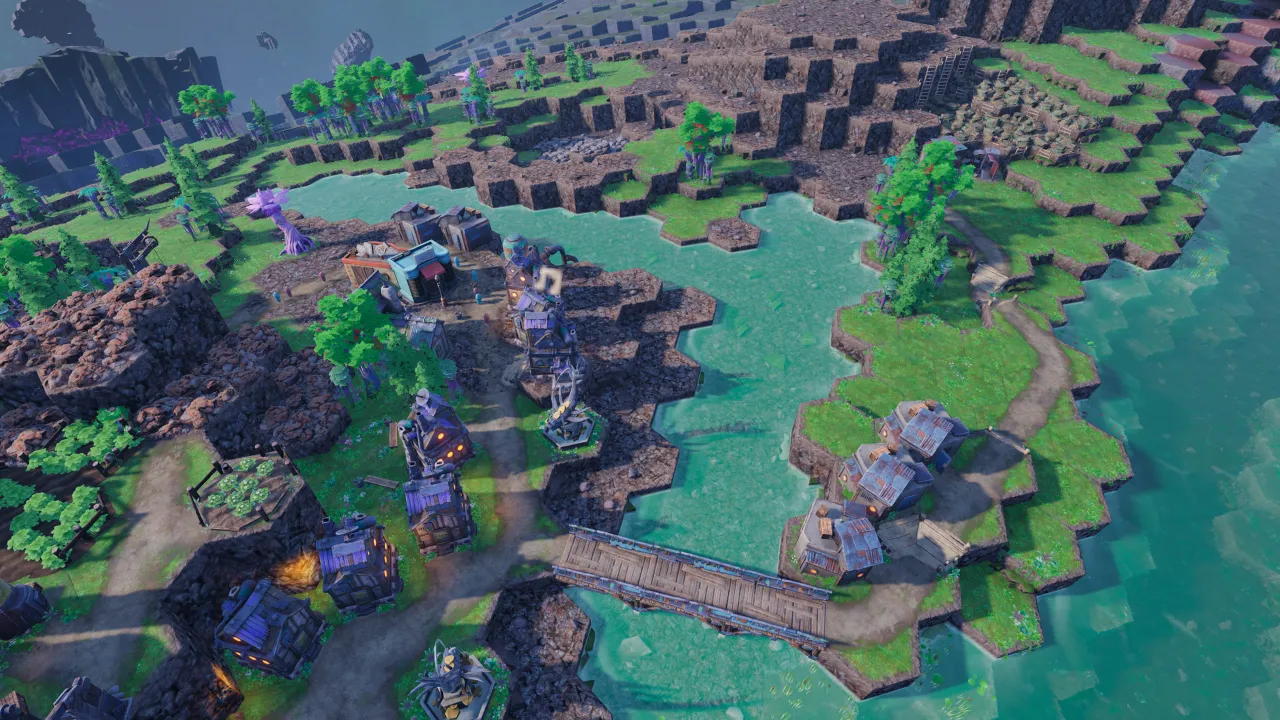
Terraforming lets you shape the space whale’s back to fit your needs. You can carve out canal routes to bring water out to dry areas, turn dead ground fertile, push back the boundaries of your atmosphere, and carve out flat building space.
Terraforming Options
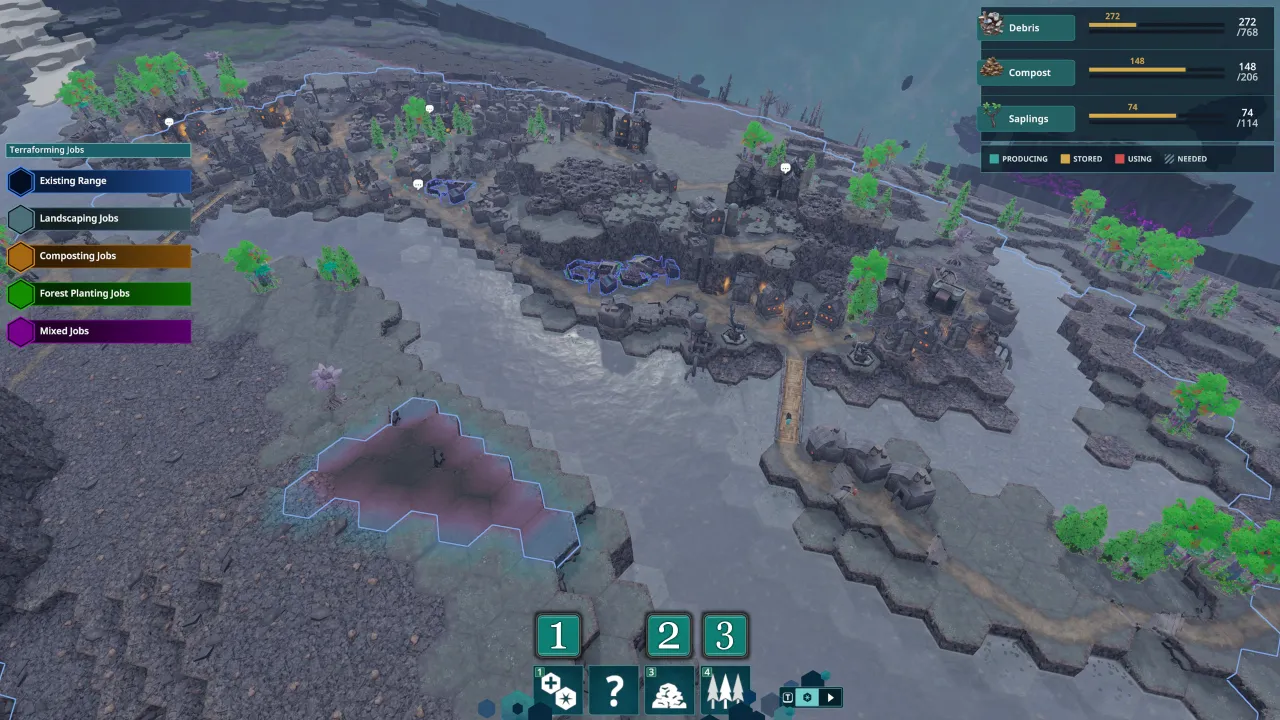
Right early on, you can unlock three distinct terraforming tools in the tech tree for your Landscaper buildings to handle:
- Landscaping – Highlight any patch of tiles and raise or lower them as many levels as you like. Raising ground takes Debris, but lowering terrain actually spits Debris right back out. I usually lower a nearby hill whenever I need materials to build up a terrace somewhere else.
- Composter – Set up a Compost Heap to turn raw organic scraps into rich soil. Spread it across barren tiles to prep them for farming and greenery.
- Forest Planting – Turn that Compost into Saplings and plant them. As trees grow, they push out your breathable atmosphere so your Peeps can spread out and build new homes.
Pollution

Pollution is the messy price of progress. Plenty of your most useful workshops pump out smog at different speeds, which spills over onto nearby ground and slowly turns into nasty Toxic Areas if you ignore it.
If a tile sits at High or Very High pollution for fifteen full minutes, it rots into a Toxic Area. Peeps flat-out refuse to work in contaminated zones, and they won’t wander in to collect loose resources either.
To wipe out Toxic Areas, throw down some Toxic Tile Scrapers or Cleaners.
Healthy Forests also naturally soak up Pollution within a 4-tile radius, so I always recommend planting a thick tree line right next to your heavy industrial zones to handle the fumes.
Kewa

Remember, you’re building on the back of a living creature! Everything your Peeps do directly impacts Kewa’s health, and if you neglect their needs, they won’t hesitate to take matters into their own fins to survive.

Take a peek at the Galaxy Map tab to track Kewa’s vital stats:
- Health – This bar tells the whole story. The green chunk is current health, while the yellow slice shows extra max health you can unlock by restoring biomes. Purple marks active Toxic Areas eating away at Kewa, and orange warns that Kewa is dangerously Overheated. If they get too hot, they’ll break route and seek out cold space on their own.
- Temperature – Shows the local temperature of your current star sector. Keep an eye on this so you know when ambient heat or freezing cold is about to stress Kewa and your Peeps.
- Happiness – Keep Kewa happy and they’ll sprout unique, valuable fruit trees for your village. Upset them, and sharp stone spikes will burst right up through your streets and buildings.
- Energy – Much like Peeps need food and sleep, Kewa spends Energy to cruise through deep space. Bigger jumps eat up a lot more stamina.
Two rules of thumb for keeping your giant friend moving: Healing Kewa boosts their passive Energy regen rate, meaning terraforming is vital for faster space travel. Second, Kewa needs to feed on Debris Fields or Asteroid Belts along the way. Digesting meals into raw Energy takes time, so expect Kewa to pull over at a rest stop mid-journey if a jump drains more stamina than they have banked.
Technology & Perks

Unlocking new tech simply comes down to meeting organic gameplay milestones. For instance, you get the Trawler simply by locating your first Ocean tile.
Every unlocked tech awards Perk Points you can spend over on the Perks tab. These perks offer awesome passive bonuses, like slashing the impact of Exhaustion, making Pollution easier to scrub out, or granting Landscaper crews a 20% movement speed boost.
Gameplay Tips
- Always check a building’s Adjacency Effects. Stacking complementary workshops side-by-side yields massive production boosts, while keeping smelly buildings away from homes keeps everyone smiling.
- Adjacency perks only work between structures sitting on the exact same elevation. Level out uneven terrain with your Landscapers before building a complex.
- Storage Sheds hold up to four separate item types, capped at 20 units per slot. Drop sheds right next to busy factories and raw resource nodes so Peeps spend less time walking and more time working.
- Scatter multiple small, self-contained villages across Kewa’s back rather than clumping everything into one giant downtown. It keeps shift commutes short and lets you tap far-off natural resources.
- Ditch individual Potato Patches as soon as you can. A single Farmhouse lets you cultivate three different crops simultaneously with far better efficiency.
- Keep Kewa clean and well-watered. When happiness is riding high, you’ll get showered with exotic wild fruit trees for your folks.
- Plenty of workshops can craft multiple recipes, though only one recipe runs at a time. Click the building whenever you want to swap output on the fly.
- Hold down LEFT CTRL while building to enter free-placement mode. It lets you freely spin and drop structures before you bother hooking them up to roads.
- Hit a sudden production wall? Check your resource flow screen. Often, you can clear a bottleneck simply by switching a generator’s fuel recipe from raw timber over to wood scraps.
- Sometimes you have to run one factory just to gather the byproduct. For example, churning Burner Generators or Smelters is the best way to stock up on the Soot your Cleaners and Metal Smelters desperately need.
- Don’t hesitate to pause buildings you don’t need right now. An unchecked factory will greedily chew through valuable ingredients and fill your sheds with junk you won’t use for hours.
- Neglect Kewa’s well-being and they will take the steering wheel, veering off-course into random asteroid fields to find a snack.
- Avoid hyper-specialized districts. Build well-rounded neighborhoods packed with houses, food, and recreation near job sites so your Peeps don’t waste their whole day walking across the map.
- Mix and match different power setups. Renewable options are scarce early on, so relying entirely on one fuel type will quickly bite you.
- Always keep tabs on what is finite on Kewa versus what can be renewed. Balancing your whale’s limited natural deposits against what you can safely trade for among the stars is key to surviving long journeys.
- Planting trees is your best long-term shield against smog. Carving canals and laying compost takes effort, but a thriving forest will soak up pollution on autopilot and save you from nasty Toxic Spills.
- Abuse the priority toggle. Bumping Cleaners up to high priority ensures workers mop up toxic sludge before it ruins surrounding tiles.
- There is zero rush to settle a new planet the exact second you spot it. Feel free to scout ahead, stock up on supplies, and come back when you’re truly prepared.
Take your time setting up your roads and keeping your Peeps well-fed so they stay off strike. Pin your five most critical supplies directly to your top bar so you never get caught off guard by a sudden shortage while cruising the galaxy.
