
Surviving UNFAMILIAR Roblox requires repairing four isolated generators, locating scattered code notes, and unlocking the front gate before a stalking intruder catches you. Your microphone feeds audio directly into the intruder’s tracking AI, meaning unnecessary real-world noise will quickly draw him straight to your location.
You start the trial with three lives and access to a detailed floor map showing key rooms such as the Library, Back Room, and Entrance. Managing your sprint stamina and keeping doors locked behind you are vital habits if you want to complete the match with a high performance rank.
Roblox UNFAMILIAR Walkthrough and Escape Guide
Essential Controls and Survival Tools
Your inventory and HUD provide several vital survival instruments right from the opening spawn. Check your map regularly to trace unsearched rooms and verify generator locations across the compound.
| Tool / Mechanic | Default Input | Gameplay Function |
|---|---|---|
| House Map | M | Displays rooms, searched drawers, exit gates, and active generators. |
| Radar | Slot 2 / Click | Scans your immediate surroundings for moving threats. |
| Taser | Slot 2 (When Held) | Fires a short-range dart that downs the intruder for 5 seconds. |
| Door Interaction | E (Open) / T (Lock) / G (Peek) | Secures doorways or inspects hallways without stepping into the open. |
| Closet Breathing | Space | Stabilizes your pulse and breath wave while hiding inside wardrobes. |
Opening your map pauses your movement, so duck into a side room before studying layout routes. In the shown run, locking hallway doors buys extra seconds while working on noisy objectives.
Step 1: Repair All 4 Generators
Your primary objective is restoring electrical power across the house by fixing four red PRO 3600i generators. Each machine triggers randomized minigames that will emit loud clangs if you fail them.
Approach a generator and press E to begin the repair sequence. If a minigame misfires, step back and confirm the coast is clear before re-engaging the engine.
- Alignment: Watch the slider bounce across the bar and press Space or left-click while the indicator rests inside the green zone.
- Number Pad: Click the numbered buttons on screen in sequential numerical order from 1 to 4.
- Voltage Drop: Rapidly tap Space to push the red charge bar back down before the system trips.
- Fuse Toggling: Click the fuse switches to match the exact target power shown on the display. In the recorded run, toggling fuses marked 8, 3, 2, and 4 met the required 17-point threshold.
Later generators introduce complex mechanical puzzles like ignition timing dials and waveform adjustments. Keep your cool when juggling multiple warnings at once.
- Ignition Timing: Steer the rotating dial into the highlighted green notch using the on-screen left and right controls, then confirm with Space.
- Fuel Pump: Tap your pump key steadily to raise the gauge into the center bracket without flooding the chamber.
- Pressure Valve: Monitor the rising pressure needle and press Space to toggle the release valve whenever it enters the danger zone.
- Oscilloscope Waveform: Adjust frequency with up and down adjustments and phase with left and right inputs until your line overlays the target signal.
- Choke and Throttle: Fine-tune both engine needles simultaneously to hold them inside their respective green brackets until ignition completes.

The wave frequency matching screen with green oscilloscope lines
Completing the fourth generator restores general electrical power across the estate. A notification will flash across your HUD directing you to locate the central computer terminal.
Step 2: Evade and Stun the Intruder
The stalker roams hallways dynamically and reacts to audio cues picked up by your microphone. If he spots you out in the open, sprint toward the nearest wardrobe or prepare your defensive gear.

The player aiming a taser at the hooded intruder in a dark hallway
Firing your taser incapacitates the intruder for exactly five seconds, giving you enough time to break line of sight. Save your single shot for tight corridors where running past him is impossible.
When hiding inside closets, you must manage your breathing using the rhythmic on-screen sound wave prompt. Press Space in sync with the expanding bars to keep quiet until the stalker mutters his departure dialogue and walks away.
Never rush out of hiding the moment footsteps stop. Peek through doors using G to verify the hallway is empty before resuming your search.
Step 3: Hack the Computer and Collect Code Notes
Once the lights come back on, head to the office terminal to reveal where the exit notes are stored. The terminal interface runs OS_KERNEL v7.0.2 and contains direct locator commands.
- Interact with the computer screen using E.
- Click and hold each LOCATE # button until its progress bar fills to 100%.
- Open your house map to see yellow drawer markers labeled Note 1 through Note 4.
- Walk to each marked dresser and hold E to search the drawers.
A dresser drawer outlined in white while being searched for notes
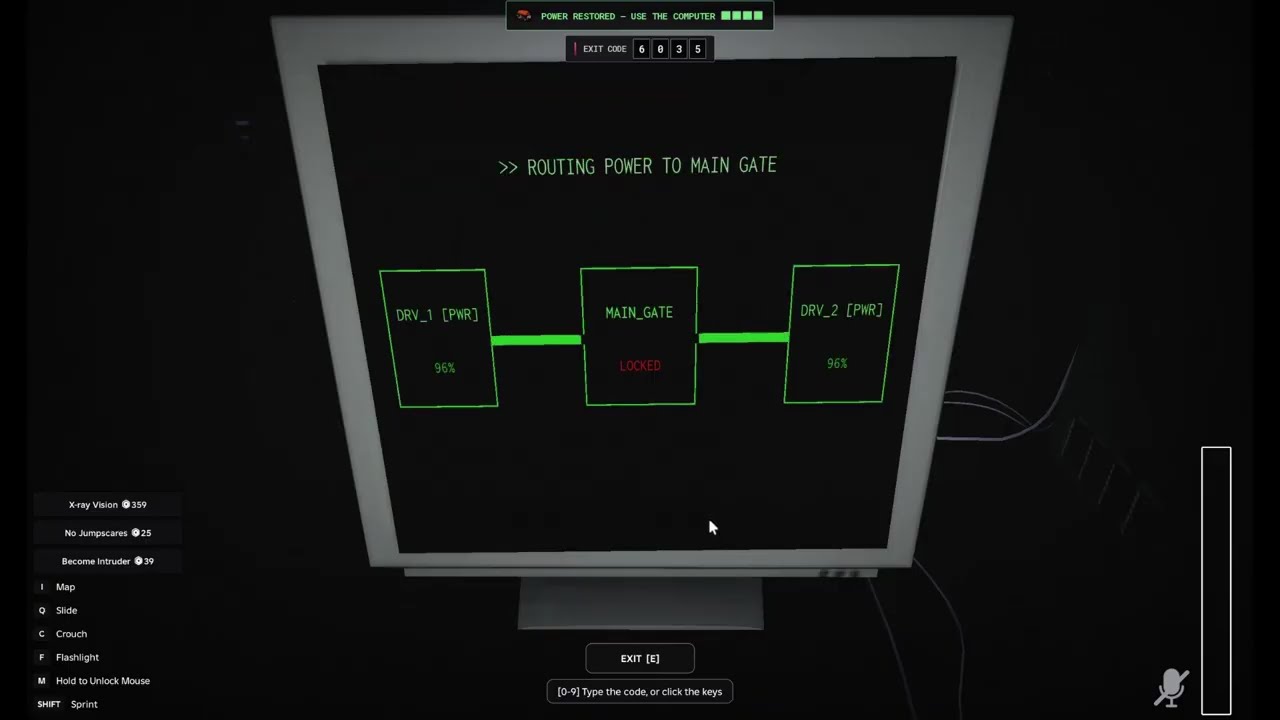
Drawer locations and individual passcode digits are randomized on every playthrough. In this featured session, collecting all four hidden scraps assembled the exit code 6035.
Step 4: Bypass the Firewall and Escape
Return to the computer room after assembling all four digits. Type your four-digit passcode directly onto the green numeric keypad and press the enter key.
Inputting the correct passcode triggers a secondary proxy firewall challenge. Read the displayed sequence before it hides itself, then click the proxy buttons in that exact order (such as Proxy B -> Proxy C -> Proxy A).
Routing the power to the main gate opens your final escape route. Pull up your map, sprint to the marked entrance chamber, and hold E on the front doorway to finish the game and secure your survival rank.
