
Star Trek: Outposts Unknown is a colony management simulator where you construct planetary facilities, direct crew members, and survive in deep space. Balancing research projects while overseeing your starship adds a distinct layer of logistical planning to every mission. This Star Trek Outposts Unknown beginners guide breaks down the core interfaces so your settlement thrives right away.
Setting up simple shelters and gathering surface materials goes quickly during early shifts. Managing points of interest and shifting your crew tasks when space weather hits your outpost view is where operations tend to stall. Checking your tech tree and scheduling labor efficiently will keep your colony functioning through cold planetary nights.
This walkthrough covers the core operational screens you need to understand right after starting a fresh save file. You will learn how to assign crew tasks, manage your starship’s role, and prioritize structural tech unlocks before environmental hazards set in.
Star Trek: Outposts Unknown brings colony building straight into the Strange New Worlds era of Star Trek.
You take the center seat aboard the U.S.S. Resonance, commanding a Starfleet crew on an uncharted mission.
As the plot picks up, you’ll build up base infrastructure, balance resources, and juggle personnel assignments to help Starfleet examine a bizarre anomaly in an untamed sector.
Star Trek Outposts Unknown Beginners Guide – Resources
As Captain of the U.S.S. Resonance—a fresh prototype ship outfitted specifically for frontier colonization—you’re dispatched to investigate a tetryon anomaly known as The Rift.
It emerged without warning inside the X’Lehari system right after Starfleet carried out First Contact.
Because this Rift brings massive potential for discovery along with major local hazards, the X’Lehari have welcomed Starfleet to study it side by side.
They’ve even granted the Federation permission to set up permanent outposts in unoccupied regions of the system to support ongoing research.
Your boots hit the dirt on the planet Daegus.
Gameplay Basics
Starting a New Game
Once Admiral April finishes briefing you on the mission, you’ll need to select your starting crew.
You’ll choose between two different starter groups, each offering a distinct mix of officers and initial cargo.
Both setups are well balanced, so don’t stress over finding a meta pick—just grab whichever roster matches your playstyle.
Every roster includes:
- First Officer
- Science Officer
- Chief of Security
- Helm Officer
- Chief Medical Officer
- Chief Engineer
- 5 Ensigns from various operations divisions
- A baseline kit of starting supplies
The first crew choice leans heavier into Science ensigns, giving your early tech research an immediate boost.
The second crew option trades that academic focus for extra construction materials and gear right out of the gate.
Honestly, regular shipments of materials and fresh officers arrive from Starfleet fairly quickly anyway.
Pick whoever looks fun to fly with, and remember you can always test the other crew on your next run.
Once your roster is locked in, you’ll order your away team down to Daegus, the first world selected for Federation development.
Welcome to Daegus, Captain. We’ve got colonies to build and plenty of cosmic anomalies to scan.
Your bridge crew and starter supplies drop into a semi-random clearing on the map to begin initial construction.
The built-in tutorials do a solid job showing you the ropes, so we’ll skip the hand-holding and stick to the key mechanics you really need to know.
The built-in help window pops up whenever a new mechanic appears.
If you close one out too fast by accident, just hit the question mark icon in the top right corner of your screen to read through past tips.
Camera Views
When you first drop in, you will only see a couple of Views on your screen. Don’t worry, the rest unlock naturally as you clear tutorial milestones and get settled on your new world.
Once you finish the main introductory tasks, you will have four core views unlocked. A few extra ones will open up later down the road as you push further into the campaign.
Going from right to left, they are:
- Outpost
- Crew Overview
- Ship
- Tech Tree

Outpost View
The game drops you straight into the Outpost view by default.
Get comfortable here, because this is where you’ll spend most of your playtime.
Construction and Buildings
The very first structure you will throw down is your Operations Center.
This basic hub serves as the core of every colony you set up. Upgrading this central structure several times throughout your run is how you unlock almost every other building in the game.
Whenever you lose track of your base, tap H to immediately snap your camera right back to the local Operations Center.
You’ll unlock a wide variety of functional buildings as you expand. New build categories show up along the bottom bar of your screen as they become available.
The game keeps that bar clean early on so you aren’t overwhelmed, but you’ll get access to plenty of options pretty fast just by upgrading your Operations Center.

Some structures run on full automation, while others need your officers stationed inside. Most are permanently fixed in place, though a few special units can actually relocate.
Secondary Building Needs
Most structures will eventually need power or physical utility lines like water and network connectivity hooked up. You will unlock the proper conduits alongside the buildings that require them.
When it comes to electricity, running Solar or going for unlimited Fusion power is your call. Both have clear pros and cons depending on your map setup, so pick what fits your current location best.
Here’s a resource extraction post that accepts any two officers regardless of rank. You’ll get the highest output and safest operation by staffing it with Security division crew, though. It also has a Move button, making it one of the rare buildings you can pack up and reposition once a patch runs dry.

Higher-tier facilities will require specific staff divisions or officer ranks to function. Keep that in mind when managing your crew, and make sure you spread out promotions and recruitment across all departments.
Check the tabs on the left side of any building’s info panel to dig into its stats and requirements. If you ever get stuck, the in-game encyclopedia has the full breakdown.
Resources
Everything your colony consumes must either be gathered from the terrain, imported, or manufactured on-site.
You can monitor your base-wide stockpile using the tracker pinned in the top-right corner of the screen.

Click that resource tracker icon to pop open the full breakdown view.
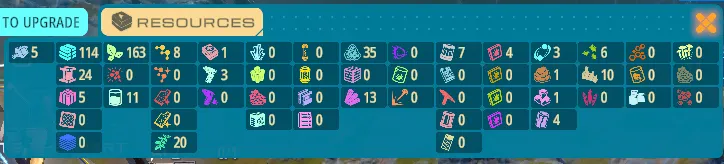
If you’re ever short on something and don’t know how to get more, just hover over its icon. The tooltip will list every single source and production building tied to it.
Raw map resources spawn as either scattered surface patches or rich, concentrated nodes. Patch harvesters are lightweight and mobile, so you can pack them up and move on once the ground is bare.
Deep node extractors are heavy-duty rigs that cannot be moved once built. I recommend using a healthy mix of both depending on how fast you’re chewing through raw materials.
Points of Interest
Scouting these locations is the true bread and butter of exploring any planetary surface.
While exploring the map, you’ll run across mostly random Points of Interest. A few reveal themselves instantly, but most need an officer or two—and sometimes extra supplies—sent out to investigate. Pull off a successful survey, and you’ll usually walk away with handy supplies or fresh intel.

These spots vary wildly. You might stumble on an everyday resource node, unlock an entirely new crafting material, find a fascinating scientific anomaly, or uncover a major storyline site that pushes your mission forward.
Yes, you really can fail an investigation. The good news?
Failing doesn’t slap you with harsh punishments right now. You simply miss out on that specific batch of loot and move on.
Maps are packed with POIs, so don’t sweat losing a couple here and there. Prep properly with the right staff, and you’ll almost never botch one.
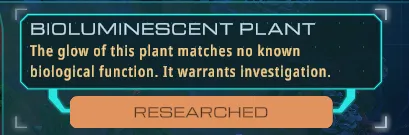
Right now, most critical storyline anomalies can’t be failed at all. For the rare ones that can, the game lets you retry until you nail it.
Check the POI description carefully, as it usually hints at which division excels at the task. Whenever you assign officers, the interface clearly shows your projected success chance alongside the total time required.

Most anomalies on the planet are scientific, making your Science officers the real workhorses here. Keep a couple extra researchers on your roster so you aren’t caught short. At its core, your mission is all about exploration and research, sprinkled with some diplomacy and daily base management.
Game Speed, Day/Night Cycle, and Space Weather
Look right at the top-center of your HUD: you’ll spot your standard speed controls alongside trackers for the local day/night cycle and early warning models for incoming space weather.
The controls are straightforward, offering a standard pause button and three speed toggles.
The day/night cycle centers around a Sun and Moon icon encircled by a blue meter. During the day, the blue ring fills clockwise until daylight runs out. Once night falls, the Moon icon appears and the blue bar sweeps clockwise again, resetting right back to dawn.
Space weather rolls in every few days and tracks along the outer ring. A yellow meter slowly fills clockwise toward the predicted arrival time.
Once the storm hits, that outer circle flares red, filling again to show how much storm duration remains. When it finishes, the red fades and the yellow timer resets toward the next forecast.
Here, the daytime gauge is almost full—it will flip to the moon icon shortly—while the outer ring shows we’re less than halfway to the next forecast storm.

Here, dawn has just broken, and a recent storm finished up, resetting the yellow outer ring.

Early on, before you research the Night Shift upgrade in the tech tree, your outpost automatically fast-forwards through nighttime. You’ll spot a glowing ‘>>’ right over the moon symbol until you unlock the tech and can manually tweak night speed yourself.
Whenever you need deeper details about your base view, check out the in-game help menu for quick diagrams and explanations.
Crew Overview
The Crew
This screen is where you manage, track, and monitor every single officer serving in your outpost.
True to Starfleet traditions, basically everyone you manage is a commissioned officer fresh out of the Academy. No enlisted folks or NCOs around here—sorry, Miles O’Brien fans. You’ll work with five recognizable ranks:
- Ensign
- Lieutenant Junior Grade
- Lieutenant
- Lieutenant Commander
- Commander
Your personnel are split across the classic six Starfleet departments:
- Command
- Science
- Engineering
- Security
- Medical
- Navigation
Because this follows the classic TOS and Strange New Worlds aesthetic, Command and Navigation wear command gold, Engineering and Security don tactical red, and Science and Medical rock science blue.
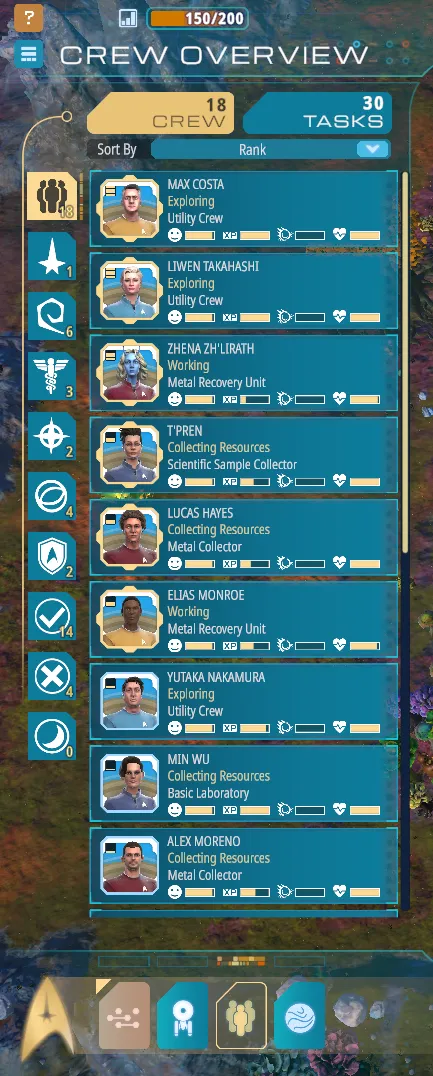
Every officer brings unique personal attributes, perks, and flaws to the table. Click anyone directly in the base view or pull them up from your crew roster to view their profile. You’ll see their rank, department, species, current health, morale, and everyday status effects.
Taking a peek at a crew profile reveals a detailed list of core and secondary stats.
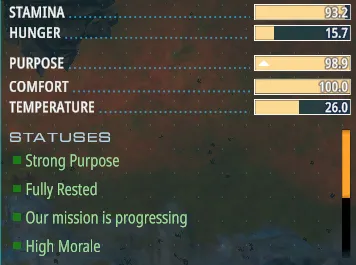
Managing these needs is your main job as captain. Keep your officers happy, healthy, and professionally challenged, and your outpost will hum along smoothly.
Primary Stats
Health: Self-explanatory. It starts fully capped, and if it hits zero, start writing a eulogy. Healthy officers naturally mend over time when other needs are met, or you can patch them up quickly in sickbay.
Morale: A shifting, cumulative reflection of their daily life. When secondary stats tank, morale nose-dives with them. Let an officer sit at rock-bottom morale for too long, and things unravel fast.
Secondary Stats
Stamina: Full is ideal. Officers burn stamina working daily shifts, draining faster on grueling assignments. They normally recharge overnight in their ship or surface quarters. Exhausted officers work poorly and suffer constant injuries.
Hunger: Empty is good here. Let hunger build, and stamina drops rapidly before physical health takes a beating. Keep the galley stocked.
Purpose: Full is best. If your CMO spends the afternoon hauling dirt or an engineer sits at a microscope, their drive plummets. Don’t overhire crew without having appropriate jobs lined up, or your specialists end up running generic errands and spiral into depression.
Comfort: Keep this filled. This is the stat you’ll constantly balance.
It covers their quarters, food quality, workplace conditions, and even whether base shielding feels strong enough. Most workplace breakdowns trace back to poor comfort, so review an unhappy officer’s status panel to see what’s bugging them.
Temperature: Varies by world and workplace. Species handle heat and cold differently.
If you keep purpose and comfort stable, temperature rarely turns into an emergency on its own. Good base shielding and sensible assignments keep everyone well within safe thresholds.
Treat your crew like human beings—or Vulcans, Andorians, and Tellarites. Keep a sharp eye on their status buffs and penalties, and you’ll run a happy, productive base.
Tasks
This is simply every chore and job waiting to be done around your outpost. You can check on all active and queued jobs under the Tasks tab, right at the top of your personnel roster. It’s pretty self-explanatory.
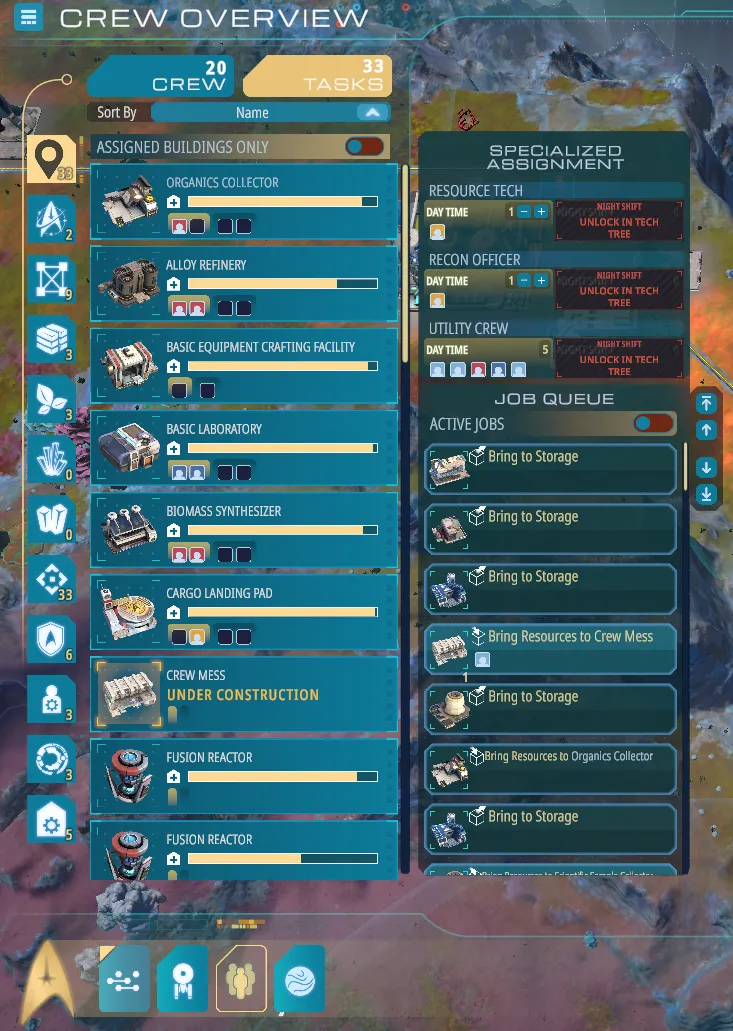
You can sort the list by building assignments, or filter it by Specialized tasks instead. New orders drop straight to the bottom and resolve in first-in, first-out order.
You can reorder priorities any time by highlighting a job and hitting the up or down arrows. Trust me, you’ll want to keep an eye on this whenever you lay down massive paths across dozens of tiles.
You can also put unassigned officers onto generic standing duties under the Specialized tasks menu, such as Resource Tech, Recon, or Utility Crew. If you want a specific officer handling map scouting, or you just brought aboard some green ensigns to haul cargo, just use the plus and minus buttons to slot them into those categories.
By default, idle officers automatically drop into the Utility Crew pool until you give them real work. Try not to leave them there too long, though, or their Purpose stat will start taking a beating.
If you ever want an extra breakdown on your officers, the built-in help guide has plenty of good written and visual walkthroughs.
Ship Overview
When you’re starting out, you won’t be staring at this screen much. It’s easy to read: crew quarters, mess hall, sickbay, cargo bays, and so on.
In the opening hours, just keep an eye on your remaining officer bunks, plus your food and medical supplies until your ground-based farms and clinics are running.
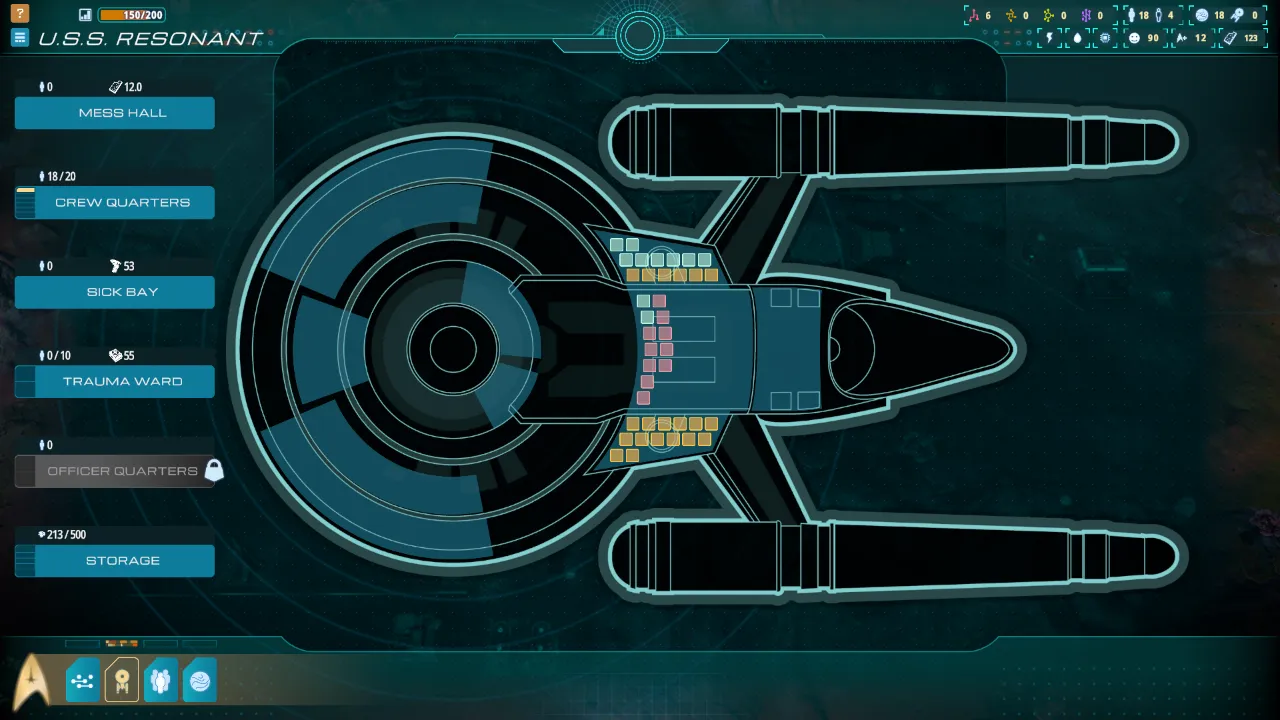
As your crew expands, officers will sleep either aboard the ship or down on the dirt. You can’t bunk someone in both spots at once.
While sleeping arrangements are tied to one place, crew members can grab lunch, visit sickbay, or blow off steam wherever is closest. Down the road, you’ll want to build up ground facilities so they don’t have to beam back up constantly.
You can upgrade parts of your ship as you work through the main story and unlock nodes in the tech tree.
If you ever want more details on ship management, the in-game help menu has plenty of great diagrams and notes.
Tech Tree
Next to upgrading your Operations Center—which is your main path forward—the tech tree is where you customize and boost your setup. Once you unlock a structure at the Ops Center, you come here to upgrade it. The exact same rule applies to your ship.
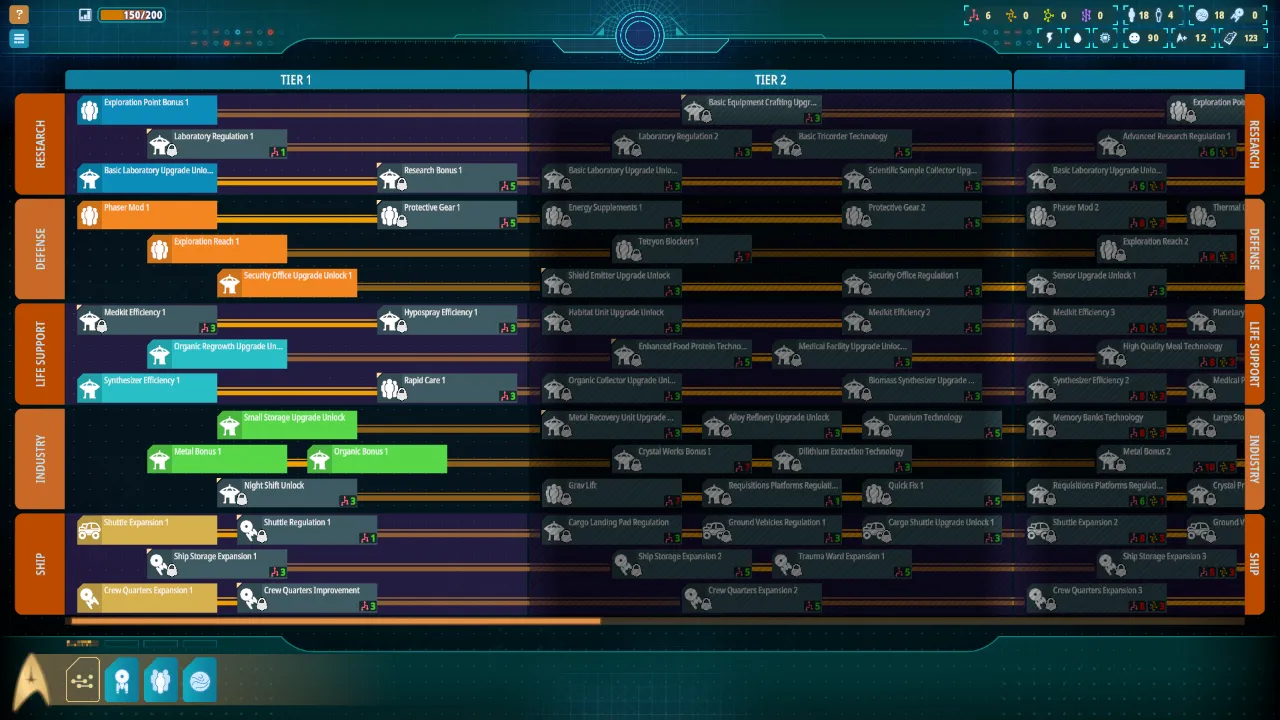
Even though it covers a massive part of the game, the loop is simple. You find samples, haul them back, process them into research points, and spend those points to unlock upgrades.
Your research takes place in dedicated science labs, with each lab type tied to a specific point tier:
- Tech Data
- Advanced Tech Point
- Exotic Tech Point
- Tetryon Tech Point
You have to hunt down specific samples for each tier, process them in matching labs, and spend the resulting points to upgrade tech you’ve already unlocked.
To grab those field samples, make sure you manufacture or trade for the right sample containers first.
For the early and middle stretches, you’ll mostly hunt for Tech Data, shown as red points. You’ll pull these from points of interest and the occasional harvestable node you spot out in the wild.
The core research loop for every tier:
Sample Container > Field Sample > Tech Point > Tech Tree Upgrade
Need an extra breakdown of the research mechanics? The in-game help menu has great visual examples of every step.
General Strategy
I’ll keep this spoiler-free so you can enjoy the story on your own terms.
As your outpost grows, you’ll run into tougher obstacles along with much better payoffs.
Play smart, come prepared, and treat the folks around you with dignity. You’ll be amazed at how far kindness gets you, both for your colony’s bottom line and the overarching story.
Scout your surroundings, lean into your officers’ natural strengths, and apply your research to smooth out daily chores. Keep that steady rhythm going as you jump from world to world across the X’Lehari system, and stay open to whatever strange new horizons pop up along the way.
It’s genuinely tough to run into a hard game-over here. The game isn’t designed to punish you like that, so use the breathing room early on to experiment with weird builds, chart the whole map, and test out fresh tech as soon as it unlocks.
Go Forth, Captain!
And that covers the basics of getting your footing in Star Trek: Outposts Unknown.
Between these fundamentals and the game’s own solid help menus, you should have plenty to start expanding your colonies. You’ll be ready to dig into that strange anomaly your science officers keep worrying about.
I didn’t design this to be an end-all min-maxing manual. Think of it as a handy companion to back up the extensive references already built into the game.
A few details might slip through the cracks, especially if updates roll out, but I’ll do my best to keep things fresh here without ruining any surprises. It’s a proper Star Trek story, and honestly, you deserve to experience those twists yourself.
Good luck out there, Captain.
Keep an eye on the day and night cycle on your outpost view so environmental hazards never catch your crew off guard. Assign your workers to sheltered tasks before storms roll in, and your colony will run without a hitch.
Based on the original guide by Kyrros